Showing posts with label Technology. Show all posts

Thursday, September 20, 2012

Technology Is Slightly Fixed

You know how I was complaining last week about all my iDevices revolting against me?

Well, it seems the technology good fortunes have come back to all my fun electronic devices. The problem I was having with my iPhone not showing all the calendars? I finally was able to fix it by LOTS of googling. So many were having the same problem that someone at Google posted a link in a forum to allow which calendars to show on iPhones. AWESOME. This is the link. Once I found that and told it which ones to sync, it magically fixed itself.

Then over the weekend, I found a way to fix the iPad contacts thing. Apparently I have to set up an exchange sync plus the Gmail sync. I don’t understand it, but it seems to be working!

I think I will get all this technology under control, sometime.

But I still don’t have a working iPod shuffle. :(

Wednesday, September 12, 2012

My iDevices are Revolting!

Technology is supposed to make life easier. Right? Well, my technology is rising up against me.

I pretty much live in my Google suite, so having my email, contacts and calendar with me at all times is one of the main reasons why I got an iPhone a few years ago. Over the past few updates, the Google sync with the iPhone has gotten better – until now. I have multiple calendars on my iPhone, including my main calendar, Hubs’ calendar (so we know where each other is during the day), the birthday and anniversary calendar and the Things to Do in St. Louis one (where we add various things around town that might be fun to do – this way we won’t forget about them!).

I’ve been having some issues with the Google sync, however. It will only show me MY calendar and not any of the others that the Google sync menu on the safari browsers tells me it should be showing. Not quite sure about how to fix this one. I’ve updated Google sync, shut the phone off and started it back up, plus let the calendar load and load and load, hoping it would get the message. NADA. Frustrating.

But that’s only the beginning of the iDevice iDebacle. My iPad is pretty darn wonderful, even if I haven’t found a good free blogging app for it. Maybe then I’d blog more, eh? All the syncing went really well when we set it up, except the contacts. It hasn’t imported or synced any of my Google contacts to the device. When I looked at Hubs’ settings, they were all the same as mine. So yeah, no idea what’s going on there, either.

Finally, I recently found my iPod shuffle (it was a replacement for my original Nano from back in the day that was recalled due to it apparently blowing up). I wanted to use it on a quick walk/run around the park and didn’t want to bother taking my iPhone out of it’s “Jessica-proof” Otterbox case. But when I plugged it in to charge it a bit, it simply wouldn’t turn on. Hours of charging later, it STILL won’t turn on. I have to take it to the Apple store and see if they can fix it.

So all of my iDevices are revolting against me. Maybe I need to go back to cassette tapes?

Thursday, December 8, 2011

Hold the Phone! Literally.

image

“Be with the friends who are here!”

I’m a bit addicted to my iPhone. If you’ve ever met me, or interacted with me on Twitter or Facebook, you know how quickly I respond to those things. I think it’s because the phone is ALWAYS in my hand. Just ask my husband.

I used to think he was just overreacting, that he just HAPPENED to look at me when I was checking my email, but that EVERY OTHER MOMENT I wasn’t looking at its fascinatingly bright little screen.

Recently, I’m starting to believe he’s right. I am addicted. I’m on the thing ALL THE TIME. If there’s that little red bubble on one of the icons, I gotta check it so it can be cleared. I don’t have push notifications on my email to save battery, so I’m obsessively refreshing the email client to see if anyone else had responded to me. Again, I have a problem!

I think for the new year, I need to divorce myself from this crazy addition. Now I’m not doing anything extreme like giving it up, but I am going to start thinking twice before I randomly pick up my phone. I’ll check Twitter and Facebook when I’m in the bathroom rather than when I’m sitting next to my husband. I am going to be truly present in every situation, rather than completely absorbed by my electronic device.

Tuesday, November 8, 2011

Isn’t Technology Supposed to Make Things Easier?

image

This has nothing to do with my problem, but the app cupcakes are so cute!

I was all set to blog a long ranting post about my iPhone and the problems I’ve been having with syncing my Google calendar there with my online calendar.

Dear Husband and I use Google Calendar and Google Docs to keep organized – we each can see each other’s calendar and know when someone is in class, or when someone is free one night to set up a date with another couple or what have you. It really comes in handy!

So when my iPhone calendar wasn’t syncing with my online calendar after I added an item on the phone, it was SO frustrating. I’m addicted to my phone (seriously, I am – just ask my husband!) and when it doesn’t work properly, I do NOT like it. I was not a happy Jessica.

But the oh-so-smart Google help forums helped me out. Turns out the Google really does know EVERYTHING. A recent update somehow changed one of my settings and calendar items were being added to the calendar on the phone and not the exchange calendar. That means that it wasn’t showing up on the online calendar as well as the phone. But by changing the calendar it’s posting to when I add the item on a drop down menu, it works!

Just like, voila, it’s fixed!

And because I was so successful in fixing my phone, I’m going to spend the rest of the evening updating my podcasts for listening to at work and folding laundry after that’s done. Don’t I live a glamorous life?

Thursday, August 4, 2011

A Bit Like a Voyeur

Am I the only one who loves seeing how other people set up their iPhone folders? No? Really? I guess I’m kind of a weird one.

I really do like peeking into other people’s phones and look through their folders. What apps have they downloaded? What’s on their homepage? What’s in the quick access bar at the bottom? I think it’s similar to peeking into someone’s purse or their medicine cabinet when you’re a house guest.

In that vein, I thought I’d share my organization. After the Great Screen Shattering of 2011, I had to start over and reload all my apps from last back up done in June. Because I had the chance to spend some time reorganizing, I thought I’d reorder the apps.

Don’t get me wrong – I love the folder option! But there’s something overwhelming about ALL of those apps, even in folders. I read somewhere about gathering up all the apps into a logical folder order, but having that at the beginning of the line, and then having three of your most used apps on that line. Seeing your favorite apps on the line makes it easier to remember what’s in the folder at the end, even if you have the name of the folder listed there.

So if any of you love to see how others organize their apps, here are my screen shots!
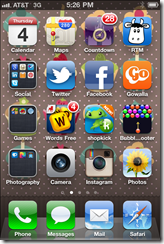
 iPhone 1

My main screen. My favorites. Calendar in the corner, Remember the Milk Pro (to do list) and of course, maps and the Disney countdown. 28 days until the Poly – not that I’m counting down the days or anything.

Twitter, Facebook, Gowalla (check in game), of course.

Games like Words with Friends – I’m clearly behind in my games.

Photos, Instagram and Camera not in a folder because they need to be easily accessible. 

iPhone 2

Here’s where it gets a little more complicated on the second page. Some random apps and then around – things like Yelp and Urban Spoon. Awesome apps. then we have entertainment things and shopping of course! Gotta have my Groupon.
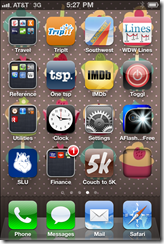
 iPhone 3

Third page continues from the second. We’ve got travel and my beloved TripIt app. Seriously, it’s the best itinerary planner out there. And then Lines – thank you for my Disney fix! You can see how long the waits are for any ride in WDW or Disneyland at any given time, and carry your touring plans for the parks in your app as well. Awesomely worth the yearly membership fee if you’re a fan like we are.
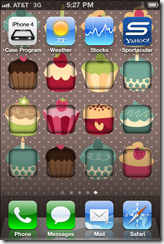
 iPhone 4

And finally – the dregs of the apps. Random things that I can’t delete or don’t want to have on more readily accessible pages.

On a side note – how adorable is that cupcake background? I can’t remember where I found it but I love it! So cute. :)

Ok – am I weird or was this interesting? How do you organize your phone?

Wednesday, June 29, 2011

Technology Sometimes Is Smarter than I Am

I have an iPhone, a Canon point and shoot camera and a DSLR. I love taking pictures, even if I’m not the best at it. It’s fun to look back and see what was going on at a particular moment in time. It’s very hard, though, since Husband is a bit camera shy.

I was writing up my post on my goddaughter’s baptism that I attended in Denver over the weekend when it occurred to me I have a bunch of photos on the iPhone since the DSLR died halfway through the weekend.

That made me wonder – for those of you with an iPhone, how do you back up your images, or even organize them on the phone? Is there an easy way to pull them off the phone and get them on my blog, for example?

I need some help in this whole technology thing. Seriously.

Tuesday, March 29, 2011

Giving is Easy!

Hunger Site logo

Have you heard of the Hunger Site?

I’ve been clicking away on this site every day for years. By visiting the home page and clicking a few links, the sponsors then donate food, free books for kids and free mammograms to those in need. If you shop in the store, you can have even more donated.

This is the absolute first site I go to every day – it’s easy to do first thing in the morning while my email is booting up. Easy and it helps something people in need – and that’s awesome!

So by 8:45 am every morning, I have donated free food, free mammograms, free food and care for animals, free meals for veterans, free child healthcare, free books for children in need and funded vital wildlife habitat.

Now that’s a way to be productive at the start of the day. :)

[This is not a compensated post – all opinions are my own.]

Tuesday, November 9, 2010

I don’t understand technology

I need help with my iPhone because I’m an idiot when it comes to technology.

I downloaded the new Facebook app and wanted to upload some pictures to the albums when I’m on the go, at events, and just around town. But it won’t let me!

I can upload pictures from the phone to the mobile album just not direct it to a specific album.

And then that leads to a whole separate question about how to go about uploaded pictures: should I create individual albums for various events and such and upload into them? If so, can you show me how?

Or, alternatively, should I just have one mobile album and just upload random pictures from my life?

Thoughts?

Am I totally overthinking this? Does anyone else sit down and really ponder how to work their social media networks like this? Am I just a weirdo?

Anyone there?

Bueller…?